
HanGraphy
Tooning IncComics
4.26.00 Reviews
- Version
- 1.0.14
- Installs
- 10.00K
- Age Rating
- Mature 17+
Screenshots
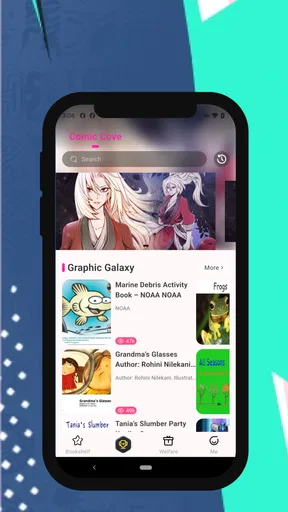
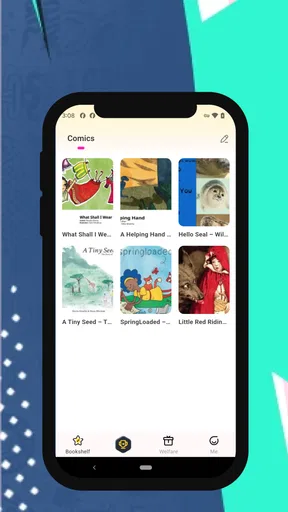
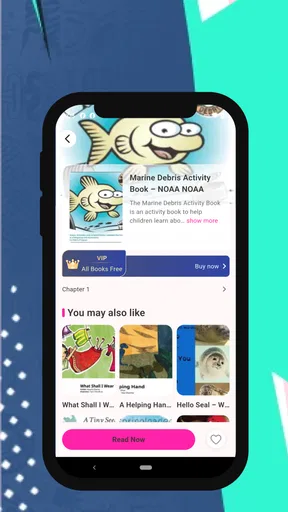
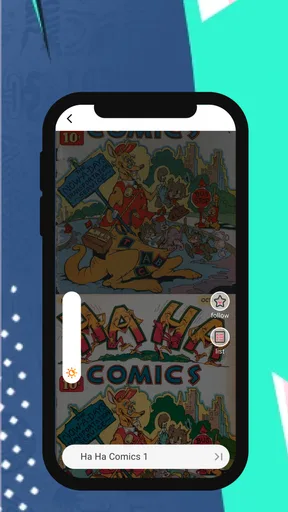
Our Review of HanGraphy
 Analysis by Appyee
I first looked at HanGraphy as the sort of comics app you might open for a quick break, but its household appeal is more interesting than that. It is a free comics app from Tooning Inc, built around colorful illustrated reading rather than a broad collection of unrelated mobile tools. The presentation feels aimed at readers who want character-driven comic and manga experiences that are easy to browse on a phone.
That makes it a reasonable candidate for a shared tablet or a family living-room device, but with an important qualification: the Mature 17+ rating changes how casually I would hand it to younger readers. I would recommend it to an adult household, older teens whose parents are comfortable with the rating, or friends who want to compare visual stories. I would not treat the word “comics” as a guarantee of child-friendly material.
How HanGraphy Fits Into a Shared Household
In a realistic home scenario, one person could use the app during a commute, then leave the tablet available for another reader later in the evening. That kind of use suits a visual reading app because the commitment is usually smaller than sitting down for a full film. A reader can browse, pause, and return when there is time, while someone else can use the same device for a different activity.
My first practical recommendation would be to decide who the device is for before installing it. On a personal phone, that decision is simple. On a shared tablet, it is not. The app’s Mature 17+ label means the adult who manages the device should make the call, especially if children can open apps without asking. This is less about assuming every comic is unsuitable and more about respecting the rating as a boundary.
The free entry point also makes it easy to try without committing money immediately. That is useful when several people in a household have different tastes. One reader may enjoy the colorful style and expressive characters, while another may prefer traditional black-and-white manga or a service with a much larger catalog. Trying it first lets the household decide whether its particular visual approach is worth keeping alongside other reading apps.
I would avoid presenting it as a replacement for every comics service. HanGraphy works better as a focused discovery option than as the only reading destination for a serious collector. If your priority is a huge back catalog, advanced library management, or a reading ecosystem shared across many devices, a more established comics platform may be a better fit. If your priority is finding something visually distinctive for occasional reading, this app has a clearer reason to exist.
What the first session tells you
The opening session should be used as a quick taste test rather than a long commitment. I would browse the available material, open several different entries, and pay attention to whether the artwork keeps my attention when the novelty of the interface wears off. Color and character design can make a strong first impression, but the real question is whether the stories are comfortable to read on the screen you use most.
This is especially important on a shared device. A phone held close to the face and a tablet viewed from farther away create different reading experiences. A layout that feels lively on a phone may feel cramped on a larger display, while a tablet can make detailed panels easier to appreciate. I would test both portrait and landscape handling if the device allows it, not because every comic needs both orientations, but because reading comfort determines whether people actually return.
A useful household habit is to let each reader describe what they liked without assuming everyone will want the same material. One person might focus on the artwork, another on the tone, and another on how quickly a story gets moving. That conversation can prevent the common mistake of judging the entire app from a single title.
Keeping setup simple without blurring ownership
Because this is a reading app rather than a shared productivity workspace, the setup should stay uncomplicated. I would install it on the device that will actually be used for reading, check the age context before handing it over, and make sure the adults in the household know whether the app is being used casually or tied to a particular reader’s account.
That distinction matters whenever purchases are possible. HanGraphy is free to install, but its in-app purchases range from $2.99 to $199.99 per item. I would not leave payment decisions ambiguous on a shared device. The safest practical arrangement is for one adult to handle any purchase deliberately, rather than allowing every person who picks up the tablet to make an assumption about what “free” includes.
I also would not assume that a shared installation creates separate reading spaces automatically. If several people use the same device, they should agree on how to avoid disturbing one another’s place. That may mean using separate personal devices, noting the title being read, or simply accepting that the app is being used as a communal browsing tool rather than a carefully separated library.
This is one of the less obvious trade-offs. A shared device makes discovery convenient, but it can make personal continuity less convenient. For a casual reader, that is minor. For someone following several stories and expecting a precise personal history, it can become irritating. The app is easier to share physically than it is to treat as a perfectly organized household library.
Coordinating reading without overcomplicating it
HanGraphy can work well as a conversation starter. A household could choose one title to sample, then compare reactions over dinner or during a weekend break. That approach uses the app’s visual identity as a social advantage: people can discuss the characters and artwork even if they do not read at the same pace.
I would keep the coordination informal. Rather than promising a synchronized club experience, I would use a simple agreement such as “this is the entry we are trying tonight” or “please do not continue past the section we are discussing.” That is more realistic for a shared-device app, where people may open it at different times and have different levels of interest.
For parents and older teenagers, the useful conversation is not only about spoilers. It is also about tone. The Mature 17+ rating gives adults a reason to ask whether the material fits the reader before recommending a title. That does not require turning ordinary reading into a formal approval process; it simply means the person making the recommendation should know the audience.
Another practical tip is to separate discovery from spending. Let everyone browse and identify what interests them, then let the account owner decide whether any paid item is worthwhile. This keeps the app’s free starting point useful while preventing the household from treating every attractive cover or promising story as an automatic purchase.
Age, trust, and the meaning of the rating
The age context is the most important factor in my recommendation. HanGraphy is marked Mature 17+, so I would place it in an adult or older-teen reading environment. I would not install it on a child’s unsupervised profile simply because the category is comics. The medium covers a wide range of subjects, and the rating is the clearest signal that the app should be approached with judgment.
For an adult reader, the rating is not a problem by itself. It simply helps define expectations. For a parent, it is a reason to preview the experience and decide whether the app belongs on a shared family tablet. For a teenager, it may be appropriate only when the household’s rules and comfort level support it. The important point is that trust should be established before access, not after an uncomfortable surprise.
I would also be careful with younger siblings who borrow an older family member’s phone. A locked screen is not the same thing as an age-appropriate app environment. If the device moves freely around the home, the owner should think about who can open the application and whether the rating matches that person. This is a household decision, not something the colorful presentation should decide for you.
The app’s relatively modest public footprint also affects how I would introduce it. It has a 4.2 average from around 73 ratings, with about 6 written reviews and over 10K installs. Those figures suggest that people have tried it, but they do not give me the same confidence I would have in a long-established service with a huge reader community. I would therefore recommend a personal test before building a household reading routine around it.
Visual appeal versus the usual alternatives
Compared with a general web-comics platform, HanGraphy’s strongest distinction is its emphasis on color, character, and charm. That makes it appealing when I want artwork to lead the experience. A conventional manga reader may be the better choice for someone who prefers a larger selection of established series, while a digital bookstore may suit readers who want to buy complete volumes and keep them in a broader book collection.
Compared with scrolling social feeds, this app offers a more intentional reason to read. I can open it looking for illustrated stories instead of waiting for an algorithm to mix comics with unrelated posts. The trade-off is that a focused comics app may feel less endlessly varied than a general feed. If you need constant novelty, HanGraphy may require more active browsing and a little patience.
It also differs from a family-friendly library app because the Mature 17+ rating makes audience fit more complicated. A parent seeking one reading service for everyone in the household should probably choose an option designed around broad age coverage. HanGraphy makes more sense as an adult-oriented addition, especially when the shared device is used by people who already understand the rating boundary.
The app is running at version 1.0.14, and I would keep that detail in mind when judging the experience. It indicates a specific current release rather than a mature, decades-old reading platform. That is not automatically negative, but it reinforces my advice to evaluate the basics directly: browsing comfort, story selection, account handling, and whether the available material justifies returning.
Who should use it, and who should skip it
I would recommend HanGraphy to an adult who enjoys colorful comics, likes discovering character-focused material, and wants a free way to explore before spending. It is also a good candidate for a couple or group of friends who enjoy comparing visual stories on a shared tablet, provided everyone understands the age rating and agrees about purchases.
I would be more cautious recommending it to a dedicated manga collector. If your ideal app has a deep archive, robust personal shelves, reliable cross-device continuity, and a large community for recommendations, the usual specialist services may serve you better. The same applies if you want to read with younger children or need a single app that clearly works for every age in the home.
I would skip it for anyone who dislikes in-app purchase models on shared devices. The broad purchase range means the account owner needs to stay attentive, even though the app itself is free to start. I would also skip it if your household cannot agree on who may access Mature 17+ material. No colorful interface is worth creating confusion about age boundaries.
My household verdict after weighing the trade-offs
My view is that HanGraphy is best treated as a selective comics destination, not a universal family library. Its free access lowers the barrier to trying it, and its colorful, character-centered identity gives it more personality than a plain document-style reader. I can see it fitting naturally into an adult’s evening routine or a shared tablet used for occasional comic discovery.
The household decision depends on boundaries more than technical enthusiasm. Before installing it on a communal device, I would confirm that the Mature 17+ rating suits everyone who can open it, decide who controls purchases, and agree on whether the app is personal or shared. Those three steps remove most of the avoidable friction.
For me, the most convincing use case is a small, trusted group that wants to sample illustrated stories together without paying upfront. The least convincing use case is a mixed-age family searching for one safe, fully separated reading space. In that situation, a more age-focused or library-oriented alternative would be the responsible choice.
Tooning Inc has made an app with a clear visual direction, and that clarity is its main strength. I would recommend giving it a measured try if you are an adult comics reader, while keeping expectations realistic about catalog depth, shared-device organization, and purchase responsibility. HanGraphy is worth exploring when colorful storytelling matters more than having the biggest possible comics library.
Verdict
Strengths of HanGraphy
- Simple interface makes browsing HanGraphy’s content quick and approachable.
- Useful for discovering Korean handwriting and lettering styles in one place.
- Visual examples can inspire personal projects, notes, or creative designs.
- Content is easy to scan without requiring advanced design knowledge.
- Suitable for users interested in Korean culture, typography, and calligraphy.
Limitations of HanGraphy
- Some content may be difficult to understand without Korean language knowledge.
- The selection may feel limited for users seeking broader typography resources.
- Image quality and presentation can vary between different examples.
- Creative features may be less extensive than those in dedicated design apps.
- Some sections may require an internet connection to load properly.
Similar Picks in This Category
View All
WEBTOON: Manga, Comics, Manhwa
NAVER WEBTOON4.6

MangaToon: Comic & Manga
MangaToon4.3

네이버 웹툰 - Naver Webtoon
NAVER WEBTOON4.3

Tapas – Comics and Novels
Tapas Entertainment Inc.4.2

Lezhin Comics - Daily Releases
LEZHIN ENTERTAINMENT3.3

WebComics - Webtoon & Manga
WEBCOMICS HOLDINGS HK LIMITED4.4
Frequently Asked Questions
What is HanGraphy and what can I use it for?
HanGraphy is an app focused on exploring and learning about Chinese characters, commonly known as hanzi. It is designed to help users recognize character forms, understand meanings, study pronunciation, and review vocabulary in a more visual way. It can be useful for beginners building a foundation, as well as intermediate learners who want a convenient reference and practice tool on Android or iOS.
Is HanGraphy suitable for complete beginners learning Chinese?
Yes, HanGraphy can be helpful for complete beginners, especially those who prefer learning through visual explanations rather than memorizing isolated word lists. The app presents Chinese characters in a structured format and may help users connect their shapes with meanings and pronunciation. However, it should be used alongside listening, speaking, and grammar practice because a character-learning app alone does not provide a complete Chinese course.
Does HanGraphy include pronunciation, meanings, and stroke-order information?
HanGraphy is intended to provide useful information about Chinese characters, including their meanings and pronunciation, while also helping users understand how characters are formed. Depending on the character and the version installed, available details may include visual breakdowns, components, or stroke-related guidance. Users should check the current app listing because features, language support, and the depth of individual character entries can change with updates.
Can I use HanGraphy without an internet connection?
Offline availability may depend on which information HanGraphy downloads or stores locally. Basic character browsing may work without a continuous connection, but features such as updates, audio, synchronization, advertisements, or online content can require internet access. Before relying on the app while traveling or studying offline, open several lessons and character pages in advance and verify that the content you need remains accessible after disconnecting.
Is HanGraphy free, and does it contain advertisements or in-app purchases?
HanGraphy’s pricing model can vary by platform and app version. Some features may be available at no cost, while additional content, premium tools, or an ad-free experience may require an in-app purchase or subscription. Before downloading, review the Google Play or App Store listing for the latest details, including advertising, optional purchases, trial conditions, and whether payment is required for the specific study features you want to use.
